
Run your whole trade business from your phone
YellowTradie is a phone app for one person running their own trade. It catches the calls you miss, writes the quote from what you say, books the job in, invoices it, chases the money and keeps the figures for your quarterly tax.
The problem
The paperwork waits until after tea
You finish the job, drive home, eat, then sit down and write a quote from memory. Half the detail is gone. The price is a guess. The customer waits two days for a number and rings someone else.
You miss a call while you are up a ladder and never ring back. A quote sits unanswered for a week. An invoice goes unpaid because chasing it is the worst hour of your week.
What it does
One phone does the lot
YellowTradie is not a quoting app with a few extras bolted on. It follows the way a one man business actually runs, from the missed call to the money in the bank and the quarter closed off.
Win the work
Catch the missed call
You are up a ladder and the phone rings. YellowTradie answers it for you and texts the caller back, so the job does not walk off to whoever picked up first.
Every enquiry in one list
Missed calls, messages and new leads land in one inbox. Urgent ones are marked, so you know who to ring first when your hands are free.
Know when the quote is read
Send a quote and see when it was opened, approved, changed or turned down. No more wondering whether it landed.
Quote it
Talk the job through
Stand in the room and say what needs doing. YellowTradie writes it down and turns it into line items with prices.
Your rates, your numbers
Your hourly rate, material markup and call-out fee are already in the app. Every quote comes out priced your way, with VAT added if you are registered.
A proper quote, sent in a minute
Send a tidy PDF by text, WhatsApp or email, with your logo, your terms and your payment details on it. Re-price a job and the old version stays on the job.
Plan the week
Your diary on your phone
Book the job in while you are still standing with the customer. The calendar shows busy days, jobs that run over more than one day and what is coming next.
A morning list
Open the app with your brew and see every job on today, with the booked time, the address and the money on it.
Straight to the door
Tap to ring the customer, send them a message or open the address in your maps app. No copying numbers out of a text thread.
Run the job
Photos and notes on the job
Snap the before and after. Dictate a note on site instead of writing it on the back of your hand. It all stays with the job.
Costs as you go
Log the materials, the skip and the fuel against the job while the receipt is still in your pocket. Add the VAT on the receipt when you are registered.
A timesheet for hourly work
For the jobs you never quoted, log your start and finish times. The hours are priced at your rate and pulled into the invoice.
Get paid
Invoice it in a minute
The job is already in the app. Turn it into an invoice and send it as a PDF with your bank details, your terms and the amount owed.
Deposits and part payments
Take a deposit up front and the balance when you finish. Every payment is logged against the invoice, so the balance is always right.
Chase the money
The app puts the late invoices and the quiet quotes at the top and writes the reminder for you. Check it, tap send, done.
Tax and the accountant
The quarterly tax return, covered
Making Tax Digital means reporting your income every quarter. YellowTradie keeps money in, money out, your taxable profit and the tax to set aside, with the days left in the quarter.
Export the lot to your accountant
Send the quarter as a spreadsheet, or export your data for QuickBooks, Xero or FreeAgent. Your accountant gets the same numbers in a fraction of the time.
VAT sorted
Set your VAT rate once and it goes on every quote and invoice. The report shows what you owe HMRC and what you can claim back.
Everything else
Set up in four steps
Your trade, your business name, your rates, your bank details. Five minutes and it is ready to quote.
Your data stays on your phone
Your jobs, customers and prices live in the app on your device. The screens on this page use sample data only.
Simple on purpose
Every screen does one job. If you can send a text and take a photo, you can run this. That is the whole test we build against.
The screens
Have a proper look
Zoomed in on the parts you will use every day. This is the app running with sample data.
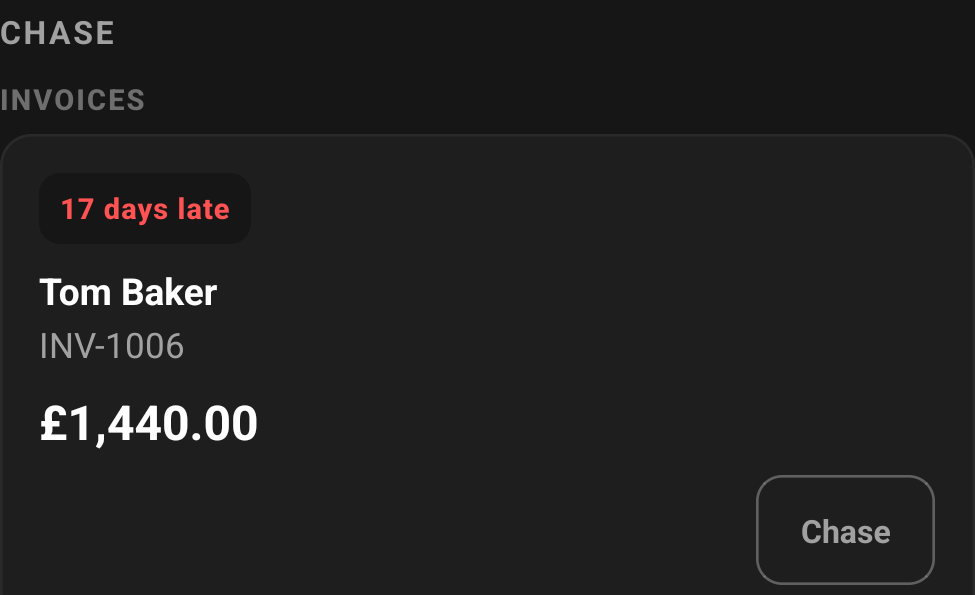
Who owes you money
The late invoices and the quiet quotes sit at the top. The app tells you why each one is there, down to the day, and writes the reminder for you.
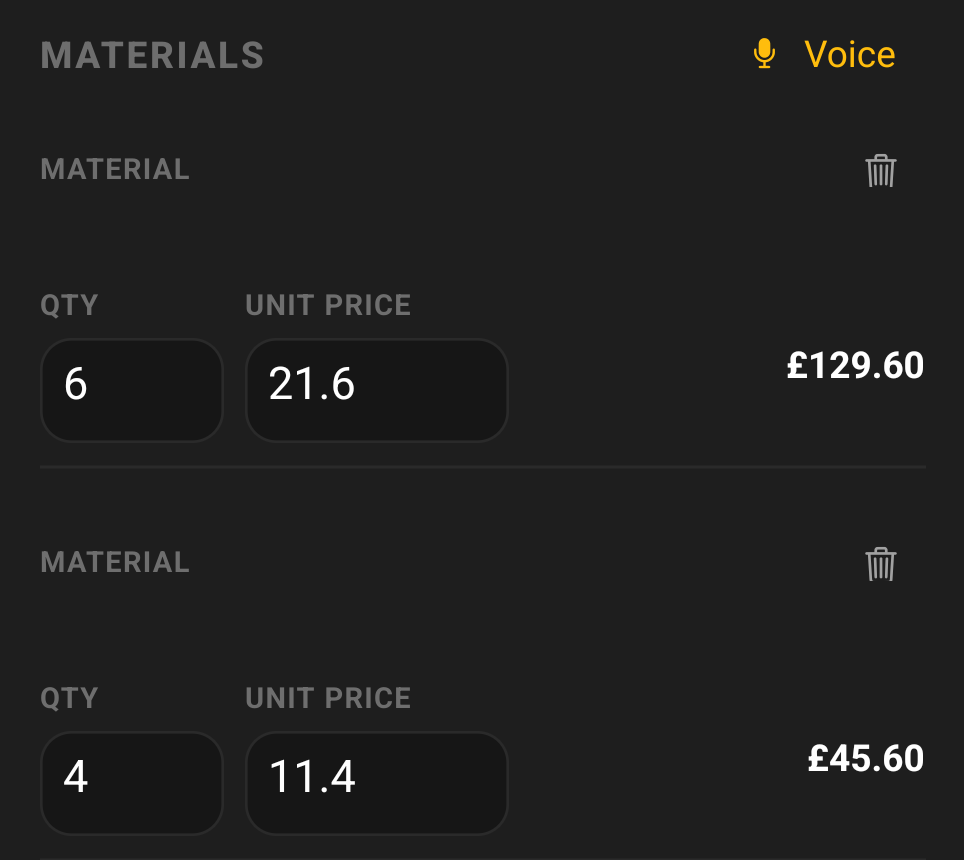
The quote writes itself
Say what the job needs. Every material comes out with a quantity, a unit price and a total, at your rates. Check it and send it.
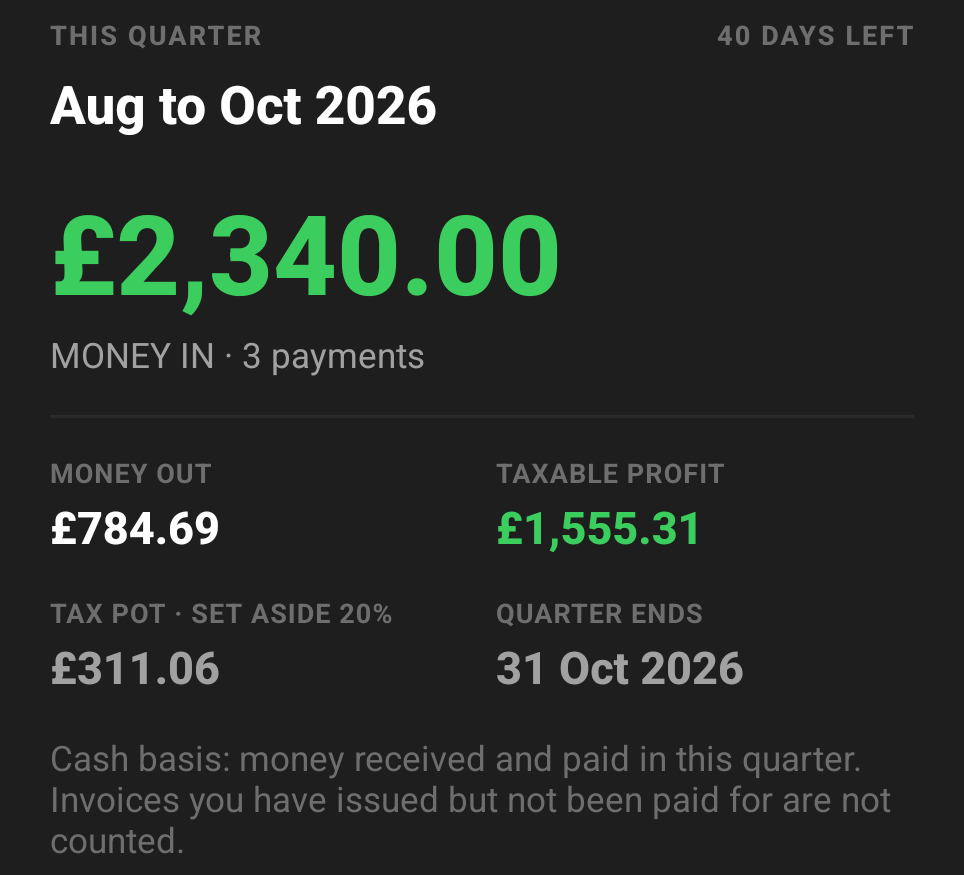
Your quarter, already worked out
Money in, money out, taxable profit and the tax pot, for the HMRC quarter you are in. It counts money that has landed, not invoices you have sent.
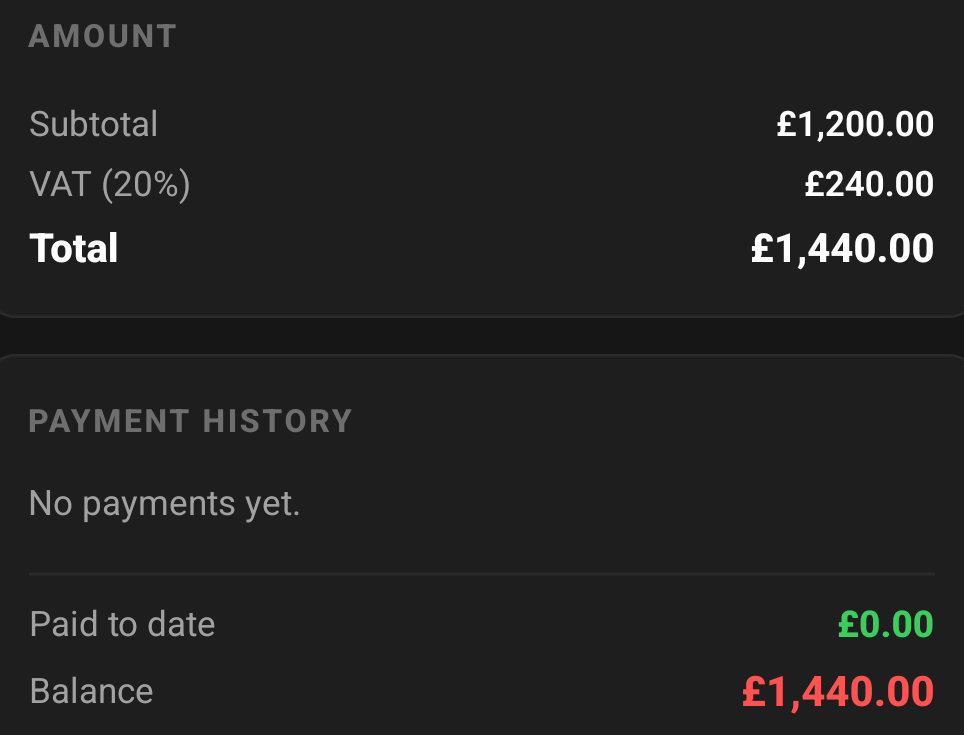
An invoice that looks the part
Your business details, the VAT broken out, the payment history and the balance at the bottom. Sent as a PDF your customer can pay from.
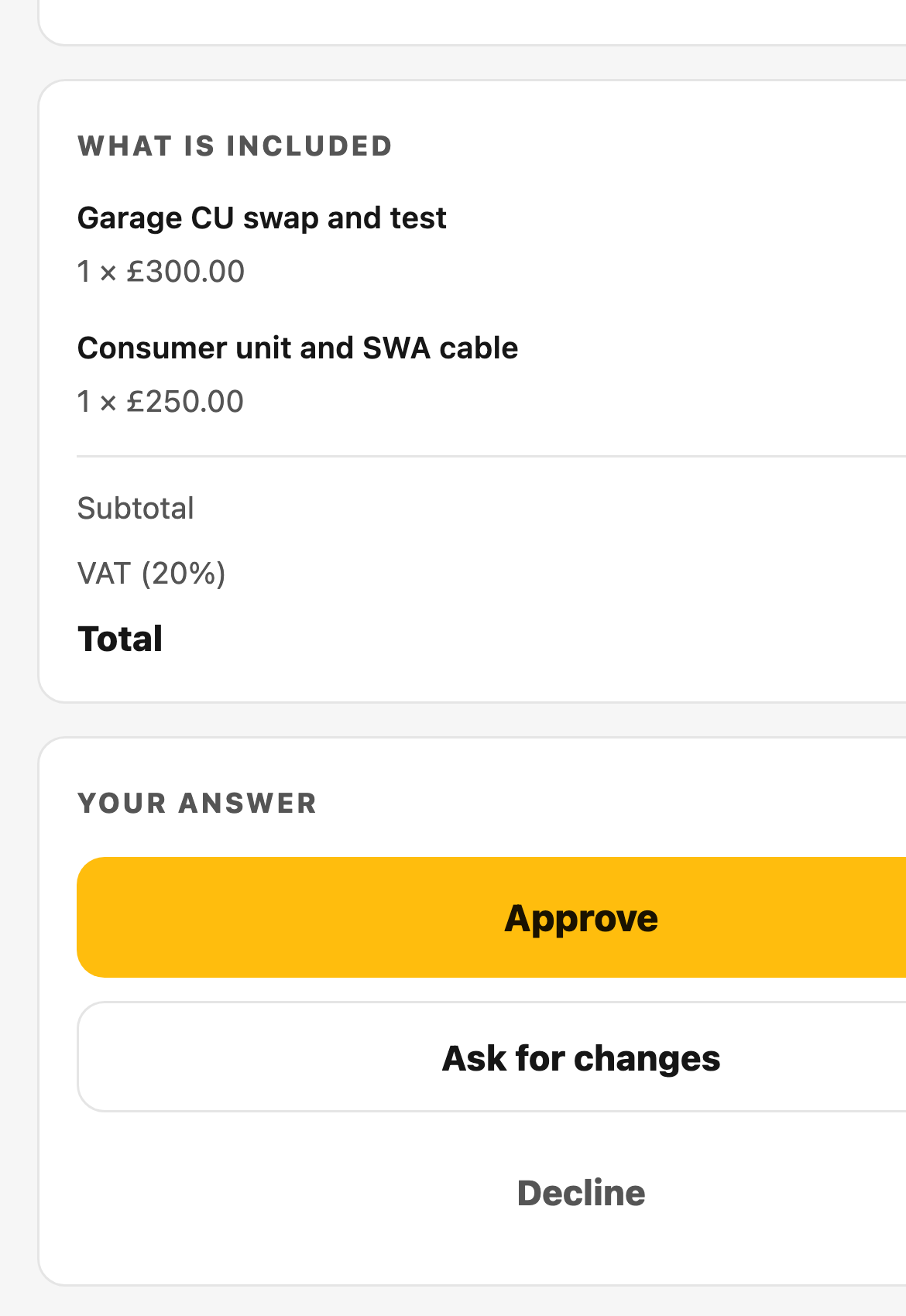
Your customer says yes on their phone
They open a link, read the quote and approve it, ask for a change or say no. The answer lands back in the app, with their words and the date.
Why it is different
Built for one person, not an office
No dispatcher. No office login. No shared calendar. YellowTradie is for the person doing the work and running the business, usually at the same time and usually in the rain.
| The job | Paper and WhatsApp | YellowTradie |
|---|---|---|
| The phone rings on site | You ring back later, if you remember. | The call is caught, the caller gets a text, the enquiry is in your inbox. |
| Writing the quote | At the kitchen table, from memory, that night. | On site, from what you say, before you drive off. |
| Knowing if it was read | You ring and ask. | You see when it was opened, approved or changed. |
| Chasing the money | You remember eventually, and it feels awkward. | The late ones are at the top and the message is already written. |
| The quarterly tax | A shoebox of receipts and a rush at the deadline. | Money in, money out and the tax to set aside, all quarter. |
If you run a team and need to hand jobs out to your lads, this is not for you yet. Tell us if that is what you need, it is useful to know.
Early access
Get in early
Leave your email and we will send your invite when it is ready. You get a say in what gets built next, and you get a low rate locked in when it goes paid.
Takes a minute. We ask for your name, your business name, your email and your phone.
Questions
Straight answers
- What does YellowTradie do?
- It runs a one man trade business from a phone. It catches missed calls, turns what you say into a priced quote, books the job into your diary, keeps the photos and costs, invoices the job, chases what is late and works out the figures for your quarterly tax.
- Do I need to be good with phones?
- If you can send a text and take a photo, you can use this. Every screen does one job. That is the whole test we build against.
- Does it work on iPhone?
- Yes. YellowTradie is built for Android and iPhone.
- How does quoting by voice work?
- Press record and talk through the job the way you would explain it to a mate. The app writes it down, sorts it into materials and labour, prices it at your rates and shows you the quote to check before you send it.
- What happens when I miss a call on site?
- The app answers the call and sends the caller a text so they know you are on the tools. The enquiry lands in your inbox with the number and the time, and you ring back when you are free.
- Can I take a deposit and part payments?
- Yes. Ask for a deposit up front and the balance when the work is done. Every payment is logged against the invoice, so the balance is always correct.
- What message does it send when an invoice is late?
- A short, polite reminder with the invoice number, the job, the amount outstanding and your bank details. You can write your own wording in the settings, and nothing is sent until you tap send.
- Does it work with QuickBooks, Xero or FreeAgent?
- You can export your income, your expenses and your quarter as a spreadsheet for your accountant, or send your data straight to QuickBooks, Xero or FreeAgent. Either way, your accountant gets clean numbers instead of a carrier bag of receipts.
- Where does my customer's information live?
- On your phone. Your jobs, prices and customers stay in the app on your device.
- What does it cost?
- Nothing during early access. Pricing is not decided yet, but early users get a low rate locked in when it goes paid, because you helped shape it. We will tell you before anything costs money.
- When do I get in?
- We are letting people in a few at a time so we can answer every message and use what you tell us. Leave your email and we will come to you.
- Is it built for teams or for one person?
- One person. One phone. There is no user list to manage and no office login. If you need to allocate jobs across a team, this is not for you yet.
Stop doing the paperwork at the kitchen table
Get on the early access list and we will email you when your invite is ready.
Get early accessFree while we build. No card. One email.